
Afro Betting Ethiopia app – bet and play on your phone
The Afro Betting Ethiopia mobile app brings the full sportsbook and casino to your Android or iOS device. Place bets on Ethiopian Premier League matches, run Aviator sessions, deposit in Birr via Telebirr — all from one app. It is worth noting that over 80% of Ethiopian bettors access platforms exclusively on a smartphone, so the app is the primary way most players in Addis Ababa, Bahir Dar and Dire Dawa actually use the platform.

Android
APK direct download · Android 6.0+

iOS
Available via App Store · iOS 13+
What the app includes
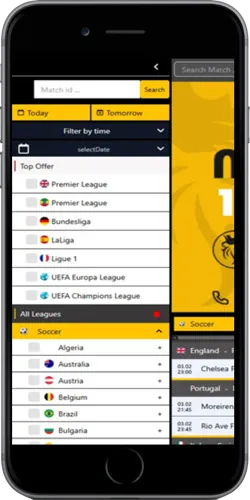
The app covers every section available on the desktop site — nothing is stripped out for mobile. You get the full sportsbook with live betting on football, tennis and athletics, the crash game lobby with Aviator (RTP 97%) and JetX, the live casino powered by Evolution, and the slots library from Pragmatic Play and SmartSoft Gaming. Compared to the browser version, the app loads roughly 30–40% faster on a standard Ethio Telecom 4G connection because assets are cached locally after the first launch.
Push notifications are available for match start alerts, score updates and bet settlement — you can configure these per sport inside the app settings. The app also supports biometric login (fingerprint or face ID depending on the device), which cuts the login process from around 8 seconds with a password to under 2 seconds. Deposit and withdrawal flows for Telebirr and CBEBirr are integrated directly inside the app, so you do not need to switch between apps to complete a transaction.
The interface is in English by default. Screen sizes from 4.7 inches upwards work well; on small screens below 5 inches some players in Gondar and Mekelle have reported that the live casino table view benefits from landscape orientation. The app does not require a VPN to function in Ethiopia as of the current period.
How to download and install the Afro Betting Ethiopia app
The Android version is distributed as an APK file rather than through the Google Play Store, which is standard for betting apps in Ethiopia. Before installing, go to your Android settings, open Security or Privacy, and enable "Install from unknown sources" or "Allow from this source" — the exact label depends on your Android version. On Samsung devices running Android 12 or later this option appears under Settings › Apps › Special app access. The whole process takes about 90 seconds the first time.
Once unknown sources are enabled, tap the download link on the partner site, wait for the APK to finish downloading (the file is typically 18–25 MB), then open it from your notifications bar or file manager and tap Install. The app installs in under 30 seconds on most mid-range phones. On the iOS side, the process is simpler: follow the App Store link, tap Get, authenticate with Face ID or your Apple ID password, and the app appears on your home screen.
After installation, log in with your existing account credentials or register directly inside the app. New accounts created in the app go through the same KYC process as the website — upload your national ID or passport photo and selfie, and verification completes in 1 to 3 business days. First-time depositors using Telebirr from within the app typically see funds credited within 3 minutes.
App technical requirements and performance
Android version
6.0 Marshmallow or higher
iOS version
iOS 13 or higher
APK file size
18–25 MB
Minimum connection
3G · recommended 4G
Languages
English
Payments in-app
Telebirr, CBEBirr, HelloCash, mBirr
Login options
Password · PIN · Biometric
Push notifications
Match alerts · Bet results
Live casino
Full Evolution lobby
Live betting
Football · Tennis · Athletics
Crash games
Aviator, JetX, Spaceman + more
Load speed vs browser
~30–40% faster after first launch
Common questions about the Afro Betting Ethiopia app
Players from Addis Ababa most often ask whether the Android APK is safe to install. Because it comes from outside the Play Store, your phone will flag it as an unknown source — that is a standard Android warning, not an indication that the file is harmful. Download only from the official partner link to avoid modified APKs circulating on third-party sites.
Another common point: if you already have a browser account, you do not create a new one in the app. Just log in with the same phone number and password. Your balance, betting history and bonus status carry over instantly. If your Telebirr deposit shows pending in the app for more than 10 minutes, the standard fix is to log out, clear the app cache under Android Settings › Apps, and log back in — this resolves the display issue in most cases without contacting support.
The app does not currently support tablet-optimised layouts. On a 10-inch tablet the interface scales up from the phone layout, which works but is not as polished as a purpose-built tablet design. Players in Ethiopia who use tablets — more common in Addis Ababa than in rural areas — generally report the browser version on Safari or Chrome gives a better experience on larger screens.